
관리 메뉴

따꿍의 프로젝트
[2025.09.13] 첨부파일 TF 전체 과정 본문
받은 리뷰와 찾은 버그 정리
1. Swiper을 영상으로 시작하면 영상 position이 이상한 버그

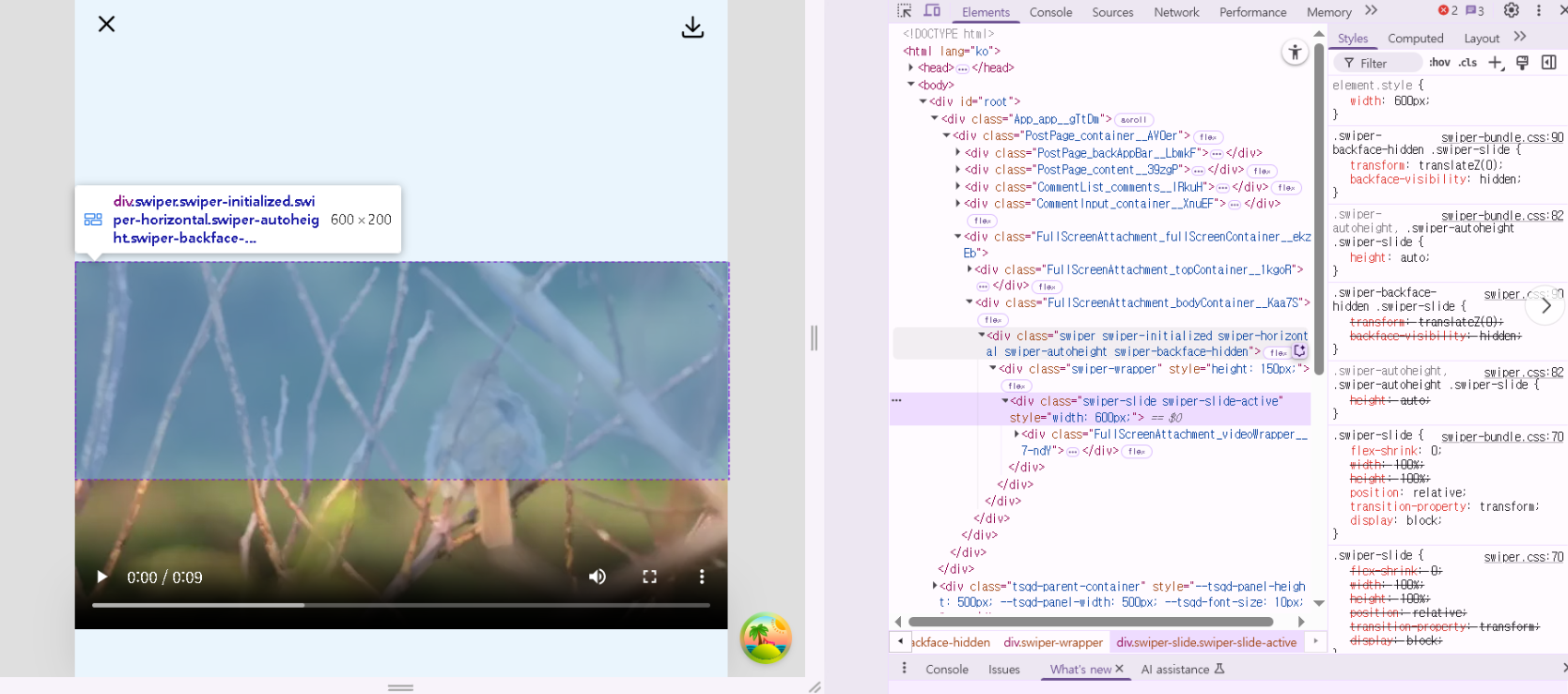
Swiper을 이미지로 시작해서 영상으로 스와이프해서 도달하면 영상 높이가 이상하지 않는데
Swiper을 애초부터 영상으로 시작하면
영상 높이가 이상해서 원하는 위치에 안 있는 버그가 있었다.
This is a common issue with Swiper + autoHeight + mixed content (images & videos).

그렇다, 대충 정리하자면 이미지는 높이 정보값이 바로바로 나와서 문제가 없는데
영상은 loadedmetadata라는 이벤트가 발생해야지만 height 값이 0에서 변동이 되기 때문에 문제가 되는 것이다.
단, 왜 이미지에서 시작했다가 영상으로 슬라이드해서 가면
영상이 정상적인 위치에 있냐면
Swiper은 onSlideChange 이벤트 발생시 자동으로 updateAutoHeight를 하기 떄문이다.
해결책
일단 updateAutoHeight를 부를 swiper instance를 저장해줄 변수가 필요하다.
const swiperRef = useRef(null);그러고 <Swiper>에다가 onSwiper 이벤트 발생시 swiperRef 값을 업데이트 해주게 한다.
<Swiper
    ...
    onSwiper={(swiper) => {
        swiperRef.current = swiper;
    }}
>
<SwiperSlide>안의 <video>에는 onLoadedMetadata 이벤트 발생시 updateAutoHeight를 하게 한다.
<SwiperSlide key={index} className={styles.attachmentsSlide}>
              {att.type === 'PHOTO' ? (
                <img
                  src={att.url}
                  className={styles.attachment}
                  draggable={false}
                  onLoad={() => {
                    swiperRef.current?.updateAutoHeight();
                  }}
                />
              ) : (
                <div
                  className={styles.videoWrapper}
                  onClick={() => {
                    const video = videoRefs.current[index];
                    if (video.paused) {
                      video.play();
                    } else {
                      video.pause();
                    }
                  }}
                >
                  <video
                    ref={(el) => (videoRefs.current[index] = el)}
                    src={att.url}
                    className={`${styles.attachment} ${styles.videoElement}`}
                    draggable={false}
                    controls
                    onLoadedMetadata={() => {
                      // force update when video reports its dimensions
                      swiperRef.current?.updateAutoHeight();
                    }}
                  />
                </div>
              )}
</SwiperSlide>'웹프로젝트 > 스노로즈' 카테고리의 다른 글
| 동영상 포함 게시물 내용 작성 중 화면 깜빡거리는 문제 해결 (0) | 2025.11.14 |
|---|---|
| VSCode에 나타나고 있는 로컬 작업을 태블릿에 보이기 (0) | 2025.11.14 |
| [2025.08.06] 포트에 실행하고 있는 프로세스 죽이기 (0) | 2025.08.07 |
| [2025.07.29] 파일 다운로드 받기 (0) | 2025.07.29 |
| [프로덕트 제작 시 놓치기 쉬운 이미지 처리 가이드] (0) | 2025.07.25 |
'웹프로젝트/스노로즈' Related Articles
more

