

따꿍의 프로젝트
현업자와 첫 대면 회의 본문
사실 이거 좀 나눠서 정리해야하긴 한데 일단 바쁘니까 까먹기 전에 한곳에 다 기록해두고 나중에 차차 정리하겠다.
Using Git source control in VS Code
아니 내가 작업할 브랜치 만들자 하는데
난 당연히 fork해서 contribute -> pull request -> merge 방식으로 생각했는데
VS Code에서 바로 branch만드는 방법이 있더라고...
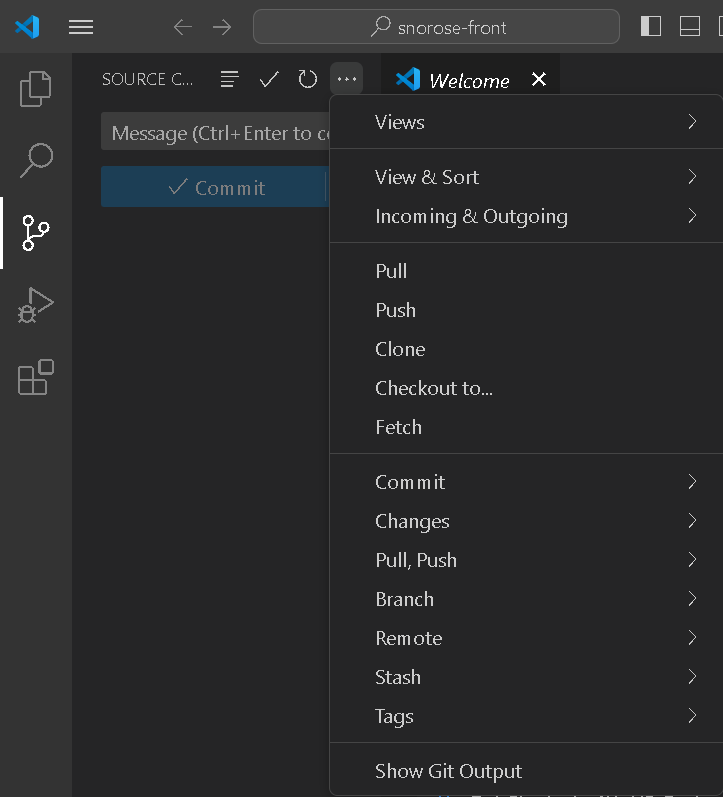
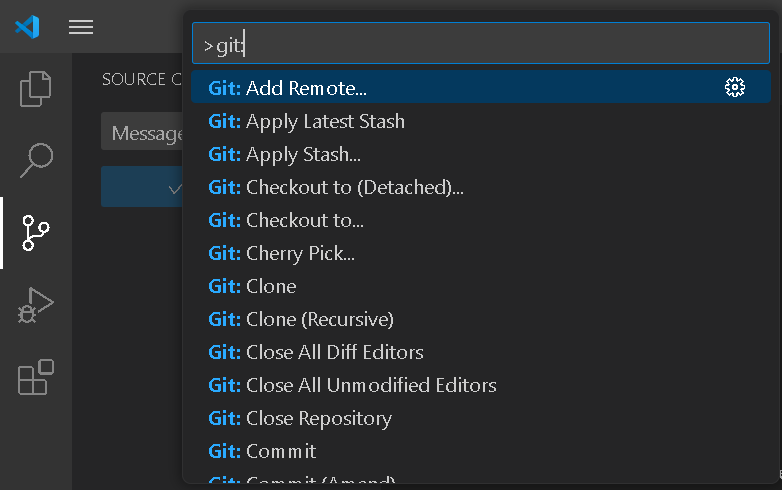
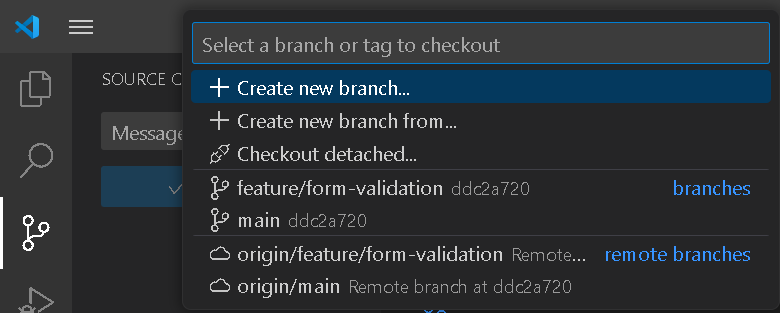
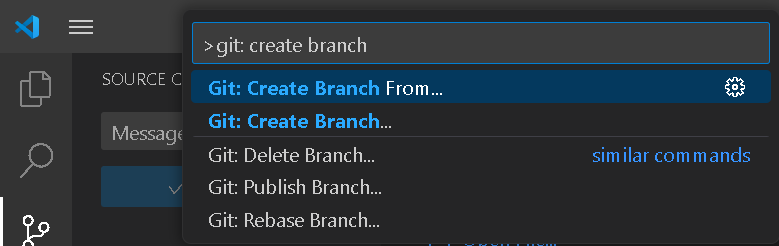
Visual Studio Code has integrated source control management (SCM) and includes Git support out-of-the-box. Many other source control providers are available through extensions on the VS Code Marketplace.
Source Control with Git in Visual Studio Code
Visual Studio Code source control management with integrated Git support.
code.visualstudio.com
Singleton이랑 Instance 객체
소프트웨어 디자인 패턴에서 싱글턴 패턴(Singleton pattern)을 따르는 클래스는, 생성자가 여러 차례 호출되더라도 실제로 생성되는 객체는 하나이고 최초 생성 이후에 호출된 생성자는 최초의 생성자가 생성한 객체를 리턴한다. 이와 같은 디자인 유형을 싱글턴 패턴이라고 한다. 주로 공통된 객체를 여러개 생성해서 사용하는 DBCP(DataBase Connection Pool)와 같은 상황에서 많이 사용된다.
간단히 설명하면 싱글톤 패턴은 객체의 인스턴스를 한개만 생성되게 하는 패턴입니다.
이러한 패턴은 주로 프로그램 내에서 하나로 공유를 해야하는 객체가 존재할 때 해당 객체를 싱글톤으로 구현하여 모든 유저 또는 프로그램들이 해당 객체를 공유하며 사용하도록 할 때 사용됩니다.
즉, 싱글톤 패턴은 아래와 같은 상황에 사용을 합니다.
- 프로그램 내에서 하나의 객체만 존재해야 한다.
- 프로그램 내에서 여러 부분에서 해당 객체를 공유하여 사용해야한다.
그니까 예를 들어서, 현재 서비스를 이용하고 있는 유저의 이름같은 것을 singleton 객체로 만들어야 한다.
왜냐하면 한 페이지에 그 유저 이름이 다른 이름으로 바뀌면 (수정 되거나 다른 유저로 로그인 될 시)
다른 페이지에서도 유저 이름이 바뀌어야하기 때문이다.
=> 객체의 인스턴스가 하나만 생겨서 여러 파일들 사이에서 공유됨 (한 곳에서의 수정은 다른 곳에 영향 줌)
Instance객체는 그와 정 반대라고 생각하면 된다.
그냥 전통적인 객체이다. 붕어빵기계 하나 만들어서, 서로 영향을 주지 않는 여러 붕어빵들은 찍어내는 녀석이다.
=> 객체의 인스턴스가 여러개 생기고 서로 영향을 주지 않음 (한 곳에서의 수정은 다른곳에 영향주지 않음)
파일 구조
정말 내가 궁금했던 것이다.
현업 프런트엔드들은 대체 어떻게 파일구조를 정리할까? (왜냐하면 내가 정리하는 방식은 아무래도 좀 더럽고... 코드도 좀 함수랑 데이터랑 다 섞여 있어서 더러워 보이고...)
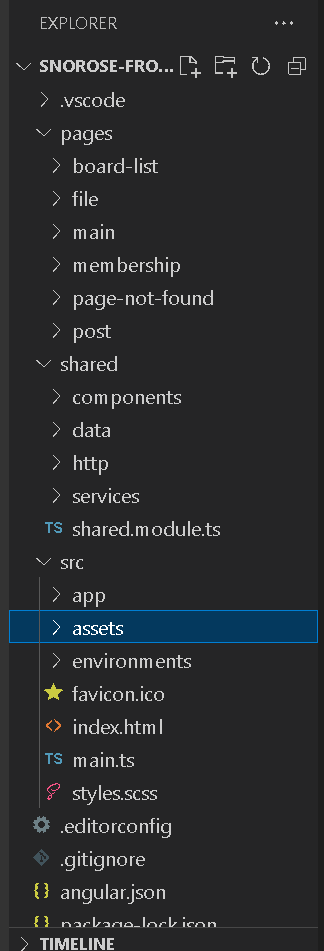
일단 Angular 기본적인것부터 설명하자면
src파일안에 index.html이 사실 이 single page application은 근간이다.
HTML, CSS, TS 번들들이 모두 이 index.html에다가 때려넣어진다.
이 index 파일을 여러서 보면 <app-root>라는 처음보는 태그가 보일 것이다.
<!doctype html>
<html lang="en">
<head>
  <meta charset="utf-8">
  <title>Snorose</title>
  <base href="/">
  <meta name="viewport" content="width=device-width, initial-scale=1">
  <link rel="icon" type="image/x-icon" href="favicon.ico">
  <link href="https://fonts.googleapis.com/css2?family=Roboto:wght@300;400;500&display=swap" rel="stylesheet">
  <link href="https://fonts.googleapis.com/icon?family=Material+Icons" rel="stylesheet">
</head>
<body class="mat-typography">
  <app-root></app-root>
</body>
</html>
React에서 JSX문법으로 만든 component랑 똑같은 녀석이다. 사용자 정의 태그이다.
얘를 어디에서 만들었냐하면,
src>app>app.components.ts에서 만들었다.
import { Component } from '@angular/core';

declare global {

  interface Array<T> {
    last(): any;
    first(): any;
    isEmpty(): boolean;
  }

}

Array.prototype.last = function () {
  return this[this.length - 1];
}

Array.prototype.first = function () {
  return this[0];
}

Array.prototype.isEmpty = function () {
  if (this.length === 0) return true;
  else return false;
}

@Component({
  selector: 'app-root',
  templateUrl: './app.component.html',
  styleUrl: './app.component.scss'
})
export class AppComponent {
  title = 'snorose';
}
여기 밑에 @Component한것을 보면
selector이 'app-root'인데, 이때 selector은 여기서 만든 component를 부를때 어떤 이름으로 부를지,
태그 이름을 생성해 준 것이다 => <app-root>
밑에 templateUrl은 어떤 HTML을 기준으로 component를 만드는지 (app.component.html) 컴포넌트 모양을 정해주는거고
또 그밑에 styleUrl은 어떤 CSS를 바를것인지 정해주는 것이다. (app.component.scss)
app.component.html
<mat-toolbar>
  <span>SNOWROSE</span>
  <span class="toolbar-spacer"></span>
  <button mat-icon-button class="example-icon favorite-icon" aria-label="Example icon-button with heart icon">
    <mat-icon>favorite</mat-icon>
  </button>
  <button mat-icon-button class="example-icon" aria-label="Example icon-button with share icon">
    <mat-icon>share</mat-icon>
  </button>
</mat-toolbar>
<router-outlet></router-outlet>
<mat-toolbar class="nav">
  <a routerLink="main">
    <button class="flex-center">
      <mat-icon>home</mat-icon>
      <span>홈</span>
    </button>
  </a>
  <a routerLink="board-list">
    <button class="flex-center">
      <mat-icon>grid_view</mat-icon>
      <span>게시판</span>
    </button>
  </a>
  <a routerLink="file">
    <button class="flex-center">
      <mat-icon>description</mat-icon>
      <span>족보</span>
    </button>
  </a>
  <a routerLink="main">
    <button class="flex-center">
      <mat-icon>account_circle</mat-icon>
      <span>계정</span>
    </button>
  </a>
</mat-toolbar>
나머지는 정적인 HTML 코드인데
딱하나만 component인 것이 보일 것이다.

사실 위 코드는 대애애충 이런 양식인데,
위 nav와 밑 nav는 고정되어 있지만 중간에 화면은 계속 re-render되야함을 느낄것이다.
쟤만 component해준 것이다.
사실 이 component안에는 여러 페이지가 나타나야하기 때문에
그런 여러 페이지들을 교통정리해주는 코드파일이 따로 있었다.
app-routing.module.ts이다
import { NgModule } from '@angular/core';
import { RouterModule, Routes } from '@angular/router';
import { SignInComponent } from '../../pages/membership/components/sign-in/sign-in.component';
import { SignUpComponent } from '../../pages/membership/components/sign-up/sign-up.component';
import { PageNotFoundComponent } from '../../pages/page-not-found/page-not-found.component';

const routes: Routes = [
  {
    path: '',
    redirectTo: '/signIn',
    pathMatch: 'full',
  },
  {
    path: 'main',
    loadChildren: () => import('../../pages/main/main.module').then(m => m.MainModule),
  },
  {
    path: 'file',
    loadChildren: () => import('../../pages/file/file.module').then(m => m.FileModule),
  },
  {
    path: 'board-list',
    loadChildren: () => import('../../pages/board-list/board-list.module').then(m => m.BoardListModule),
  },
  {
    path: 'post',
    loadChildren: () => import('../../pages/post/post.module').then(m => m.PostModule),
  },
  {
    path: 'membership',
    loadChildren: () => import('../../pages/membership/membership.module').then(m => m.MembershipModule),
  },
  {
    path: 'signIn',
    component: SignInComponent
  },
  {
    path: '**',
    component: PageNotFoundComponent
  }
];


@NgModule({
  imports: [RouterModule.forRoot(routes)],
  exports: [RouterModule]
})
export class AppRoutingModule { }
app.component.html에서 <a>태그를 유심히 살펴보면 routerLink="file"같은게 달려있는 것이 보일 것이다.
뭐를 눌렀냐에 따라 app-routing.module.ts에서 어디 "path"로 가는지 정해지고
그에따라 리턴되는 component 종류도 달라진다.
근데 이런 방식은 진짜 React도 사용하면 꽤 괜찮아보여서 유심히 봤다.
shared파일은 말 그대로 협업할때 여러 개발자들이 공유해서 쓸거 같은 데이터나 함수/클래스들을 모은 느김이다.
사실 나는... 학교에 프런트가 귀해서 말만 팀프로젝트이고 사실은 혼자서 프런트일 거의 해왔어서
이런 개념이 안잡혀 있는데
역시 대규모 프로젝트들은 겹치는 코드, 불필요하게 중복만 되는 코드들은 가독성 줄어드니 없애야하므로 예쁘게 정리해주는것 같다.
shared의 하부파일
- components: 자주 쓰일것 같은 컴포넌트 (유저 프로필 아이콘, 버튼...)
- data: 자주 쓰일것 같은 정적상태의 데이터 (export const majorList=['디자인학부', '법학부'....])
-> 동적상태 데이터는 백엔드 영역임...
- http: 서버와 통신할때 쓰는 공통의 코드 (가장 신기했음)
- services: 보통 singleton인 애들 모으는 곳
pages 파일은 말그대로 여러 페이지들을 정리해놓은 파일이다.
각 페이지 폴더 안에는

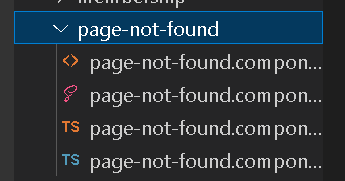
해당 페이지와 관련된 ts이랑, html, css, 컴포넌트들이 정리되어 있다.
난 페이지 파일중에 page-not-found (404 페이지)가 준비되어 있는것도 참 신기했다.
ICT인턴이나 IPP 인턴을 꼭 해봐라
좋은 경험이라고 한다. 자신은 저런 식으로 인맥 통해서 취업했다고.
Swiper.js
Swiper - The Most Modern Mobile Touch Slider
Swiper is the most modern free mobile touch slider with hardware accelerated transitions and amazing native behavior.
swiperjs.com
많이 쓰이는 라이브러리라고.
다음까지의 목표
- 일단 Angular 강의 듣는건 좋다고 했다. 근데 최신거 들으라고 당부하신다.Angular은 확확 바뀌었다고...
- pages>membership>components>sign-up을 보고
- pages>membership>components>forms에 input 입력 제한 코드 같은 걸 작성해보라고 한다.
- FormsModule에 이미 양식이 여러개 있으니까 참조하라고 하셨다.
https://angular.io/api/forms/FormsModule
Angular
angular.io
(나한테 프로그램 돌리는데 치명적인 것은 아직 안 밑길거라고)
'웹프로젝트 > 스노로즈' 카테고리의 다른 글
| [2024.06.30] rem 사용하기 (0) | 2024.07.01 |
|---|---|
| [2024.06.30] 한 CSS 파일을 다른 CSS 파일에 포함하기 (0) | 2024.07.01 |
| [2024.06.29] PostCSS 사용해보기 (0) | 2024.07.01 |
| [2024.06.25] 프런트 레포 파기 & dev 브랜치 & 깃허브 이슈 사용하기 (0) | 2024.07.01 |
| [2024.05.25] Angular에서 React로 모집하기 (0) | 2024.07.01 |