문제의 발단
스노로즈 프런트 개발 때문에 Angular을 깔려고 공식문서에서 말한대로 따라하고 있었다
https://angular.io/guide/setup-local
Angular
angular.io
To install the Angular CLI, open a terminal window and run the following command:
content_copynpm install -g @angular/cli근데 해도 안되길래 밑에 있는 추가 설명을 읽어보니
윈도우 OS 컴퓨터들에서는 PowerShell script의 실행이 디폴트로 꺼져 있기 때문에
직접 "PowerShell 스크립트 보낼거니까 허용 해줘!"를 보내야한다고 한다.
On Windodws client computers, the execution of PwerShell scripts is disabled by default. To allow the execution of PowerShell scripts, which is needed for npm global binaries, you must set the following execution policy.
Carefully read the message displayed after executing the command and follow the instructions. Make sure you understand the implications of setting an execution policy
content_copySet-ExecutionPolicy -Scope CurrentUser -ExecutionPolicy RemoteSigned궁금한점
Window PowerShell은 뭐고 CMD랑 차이가 무엇인가?
1. What is Window PowerShell
PowerShell is a cross-platform task automation solution made up of a command-line shell, a scripting language, and a configuration management framework.
PowerShell runs on Windows, Linux, and macOS.
Commands for PowerShell are known as cmdlets (pronounced command-lets). In addition to cmdlets, PowerShell allows you to run any command available on your system.
Cmdlets are native PowerShell commands, not stand-alone executables. Cmdlets are collected into PowerShell modules that can be loaded on demand. Cmdlets can be written in any compiled .NET language or in the PowerShell scripting language itself.
As a scripting language, PowerShell is commonly used for automating the management of systems. It's also used to build, test, and deploy solutions, often in CI/CD environments. PowerShell is built on the .NET Common Language Runtime (CLR). All inputs and outputs are .NET objects. No need to parse text output to extract information from output. The PowerShell scripting language includes the following features:
- Extensible through functions, classes, scripts, and modules
- Extensible formatting system for easy output
- Extensible type system for creating dynamic types
- Built-in support for common data formats like CSV, JSON, and XML
Windows PowerShell and PowerShell are two separate products.
- Windows PowerShell is the version of PowerShell that ships in Windows. This version of PowerShell uses the full .NET Framework, which only runs on Windows.
2. PowerShell vs CMD
CMD and PowerShell both aim to provide command-line access to a Windows system. However, they significantly differ in complexity and the features they offer.
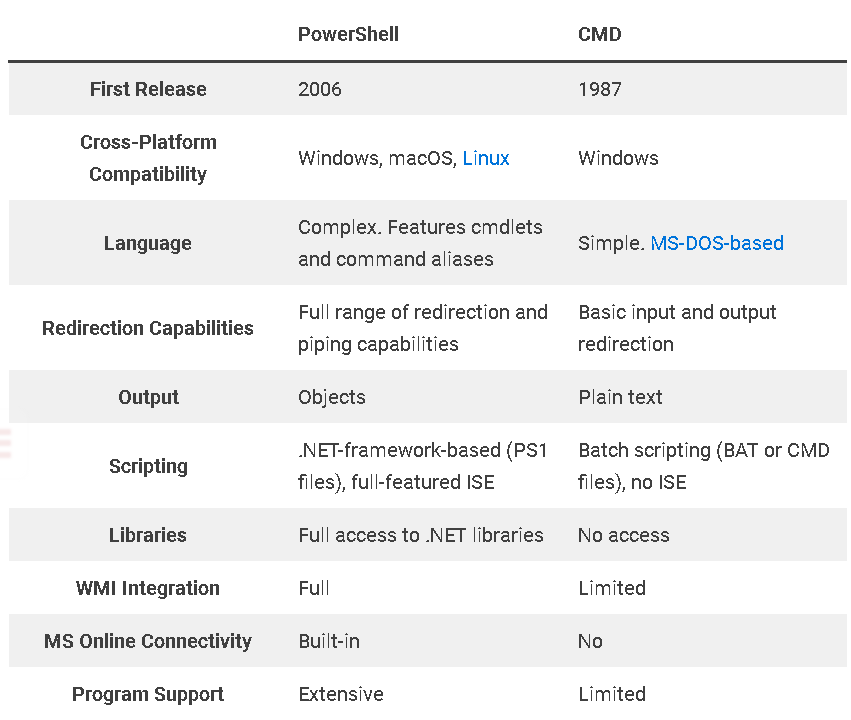
PowerShell vs. CMD: What's the Difference? | phoenixNAP KB
Understand the differences between PowerShell and CMD, two tools for managing Windows systems via the CLI by reading this comparison article.
phoenixnap.com
Given its simplicity and maturity, use CMD to:
- Execute quick and straightforward commands.
- Run third-party command-line tools designed for CMD.
- Run legacy batch scripts.
The modern design and advanced capabilities of PowerShell make it the better choice for:
- Task automation and system configuration management.
- User and event administration.
- Cloud resource management.
- Data processing.
'오늘의 개발지식' 카테고리의 다른 글
| [파이콘 스프린트] Braillify 오픈소스 참여 (0) | 2025.08.17 |
|---|---|
| [Verilog] 고쳐야 하는 습관 (0) | 2024.05.30 |
| [Github] Clone Failed - unable to checkout working tree (0) | 2024.05.03 |
