

따꿍의 프로젝트
[2026.02.24] node version crash & 프로젝트마다 노드 버전 달리하기 본문
문제
정확한 문제는 못 찾았지만,
스느로즈 때문에 노드를 22 버젼으로 업데이트하고 난 후로부터 안되기 시작하는것을 봐서는
노드 버젼을 바꾸면서 졸작 안에 쓰이고 있던 라이브러리들이 한꺼번에 버그난 것 같다.
해결과정
1. 라이브러리들 다다시 깔아서 자동으로 버젼 맞춰지게 만들기
rm -rf node_modules
rm -rf android/.gradle
rm -rf android/build
rm -f package-lock.json

npm cache clean --force
npm install

cd android
./gradlew clean

npx react-native start --reset-cache
npx react-native run-android
이걸 계에에에에속 했다.
문제는 한놈 버젼 맞춰주면 다른놈 버젼에 문제가 생겨서 무한 굴레에 빠지게 됐다.
2. 팀원의 package.json과 package-lock.json 가져와서 써보기
팀원은 되고 있다고 하니, 그 사람의 환경으로 완벽하게 맞춰주면 되지 않을까라는 생각에
그 사람 package.json을 가져오고 미친듯이 npm install을 해봤다.
그래도 계속 에러가 났다
3. 노드 버젼 다운그레이드
찾아보니 최근에 바꿨던 node 22버젼이 react native에서는 잘 지원을 안한다는 글을 읽었다
아마도 앱이니까 웹보다 한단계 느리게 발전하나보다.
그제서야 아, 내 노드버젼이 문제일수도 있겠구나 싶어서
팀원을 노드 버젼을 물어보고 node v20.19.0으로 다운그레이드하고
그래도 내 컴퓨터에 확실히 돌아갔던 것으로 기억하는 main 브랜치를 켜보니....
그래도 에러가 났다.
4. Re-clone
이미 너무 자주 수정하고 library랑 안에 gradle이랑 등등 다 corrupt돼서 그럴 수도 있겠다 싶어서
그냥 로컬을 지워버리고
github에서 main을 새로 clone했다. 그러니까...
감격스럽게도 크흡 돌아가기 시작했다. 야호!
With React Native + native modules + Gradle + Node + caches… once things get even slightly corrupted, sometimes:
🔥 Delete project
🔄 Re-clone
📦 npm install
🚀 Run
is genuinely the fastest path back to sanity.
What likely happened:
- Some native build artifacts survived between version switches
- Gradle cache got weird
- node_modules didn’t fully reflect the new Node environment
- Autolinking metadata got stale
Cloning gave you:
- Clean android build folder
- Clean lockfile
- Clean native config
- Zero residue from earlier experiments
미래를 위한 팁
When things start getting cursed, try this order:
- gradlew clean
- Delete node_modules + lockfile
- If still broken → re-clone
Re-cloning is not “giving up.”
It’s just forcing a deterministic environment reset.
프로젝트마다 노드 버전 달리하기
.nvmrc 사용하기
Inside your project root, set .nvmrc with the node version you plan to use in that project inside the file
echo 20.19.0 > .nvmrc
Commit it to git.
Then whenever you enter the project:
nvm use
⭐ Switching Node changes the Node version only for that current shell session.
If you:
- Open a new terminal
- Or open a new tab
It will fall back to whatever your nvm alias default is set to.
🔐 Even Better: Lock Node Version in package.json
Be strict on you node version so you don't accidently use another node version by accident
"engines": {
  "node": "20.19.0"
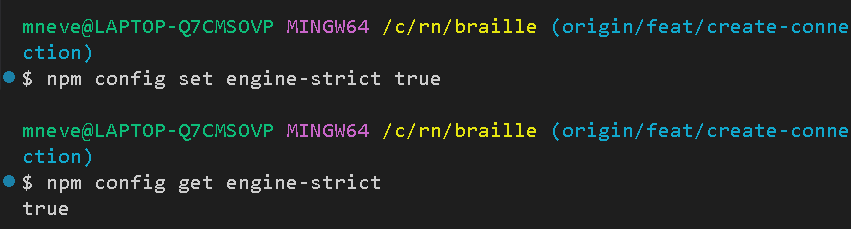
}npm config set engine-strict trueNow npm will refuse wrong Node versions.
내 개인 디바이스에만 적용되나 보다.
Best Practice for React Native Teams
Always commit:
- package-lock.json
- .nvmrc
- Node version in README
That completely eliminates:
“It works on my machine.”
'웹프로젝트 > 졸작' 카테고리의 다른 글
| [2026.03.16] 안드로이드 기기에 앱 다운받기 (0) | 2026.03.16 |
|---|---|
| [2026.02.24] 다른 브랜치 작업 현 브랜치로 옮기기 (Cherry-Pick) (0) | 2026.02.24 |
| [2024.11.06] PDF Screen 생성 (0) | 2025.11.06 |
| [2025.10.14] 카카오 도서 API에서 Book 테이블 크롤링하기 (0) | 2025.10.15 |
| [2025.10.13] pdf에서 텍스트 추출 (0) | 2025.10.13 |