
따꿍의 프로젝트
[2026.02.13] 에디터 기본 스타일링 세팅하기 본문
작업의 배경
TipTap은 Headless이라 기본 세팅을 하면 아무 style이 적용되어 있지 않은 상태이다.
Headless
- 로직만 제공 (에디터의 기능 - 텍스트 편집, bold, undo, history)
- UI는 제공하지 않음 (버튼 UI, 툴바 디자인, 기본 CSS 스타일 제공 X)
- 완전 커스터마이징 가능하게 HTML 덩어리만 주는 것
그래서 에디터를 그냥 사용하면 아무 스타일링 안한 html태그 모양과 동일하게 생기게 된다.
왼쪽은 기존의 TextareaAutosize의 스타일링을 h1태그/p태그와 비교한 사진이고
오른쪽은 에디터의 스타일링을 h1태그/p태그와 비교한 사진이다.
(h1와 p태그는 reset.css 때문에 똑같게 생겼다)

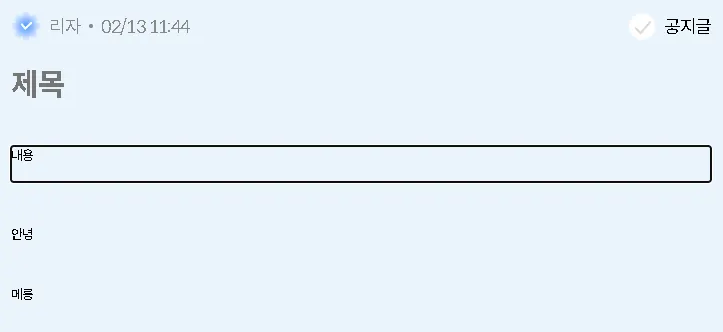
현재 날것의 에디터 스타일은 기존의 TextareaAutosize에 비해 가독성이 매우 떨어지기 때문에
에디터 기본 스타일을 TextareaAutosize에 맞춰주기 위해 작업을 시작했다.
작업 과정
1. 기본 스타일 적용
통상적으로 디폴트 fontsize와 color을 세팅하는 방법은 다음과 같다고 한다.
.ProseMirror {
  font-size: 16px;
  color: #222222;
}
ProseMirror appears in the CSS because Tiptap is built on top of ProseMirror
https://tiptap.dev/docs/editor/core-concepts/prosemirror
ProseMirror | Tiptap Editor Docs
Access the ProseMirror API and functionality with the Tiptap PM package while developing your editor. Learn more in the docs!
tiptap.dev
2. placeholder 적용
Tiptap에서 제공하는 official Placeholder extension이 존재한다.
import { Editor } from '@tiptap/core'
import { Placeholder } from '@tiptap/extensions'

new Editor({
  extensions: [
    Placeholder.configure({
      placeholder: 'Write something …',
    }),
  ],
})
https://tiptap.dev/docs/editor/extensions/functionality/placeholder
Placeholder extension | Tiptap Editor Docs
Configure a helpful placeholder to fill the emptiness in your Tiptap editor. Learn how to set up and use it here in the Docs!
tiptap.dev
결론
/*에디터 initial style*/
:global(.ProseMirror) {
  font: var(--text-headline-2-reg);
  color: var(--grey-4);
}
:global(.ProseMirror:focus) {
  outline: none;
}

/*에디터 placeholder style*/
:global(.ProseMirror p.is-editor-empty:first-child::before) {
  content: attr(data-placeholder);
  color: var(--grey-placeholder);
  font: var(--text-headline-2-reg);
  pointer-events: none;
  float: left;
  height: 0;
}'웹프로젝트 > 스노로즈' 카테고리의 다른 글
| [2026.02.24] TipTap 에디터 추가 작업 (0) | 2026.02.24 |
|---|---|
| [2026.02.24] TS 타입 정의 컨벤션 (0) | 2026.02.24 |
| [2026.02.13] 헷갈리는 git 작업 정리 (0) | 2026.02.13 |
| [2026.02.13] 당장 필요하지 않은 코드는 없애라 (0) | 2026.02.13 |
| [2026.02.13] rest.css (0) | 2026.02.13 |
